GSC Golden Zone: How to Find Striking-Distance Keywords (Positions 4–20)
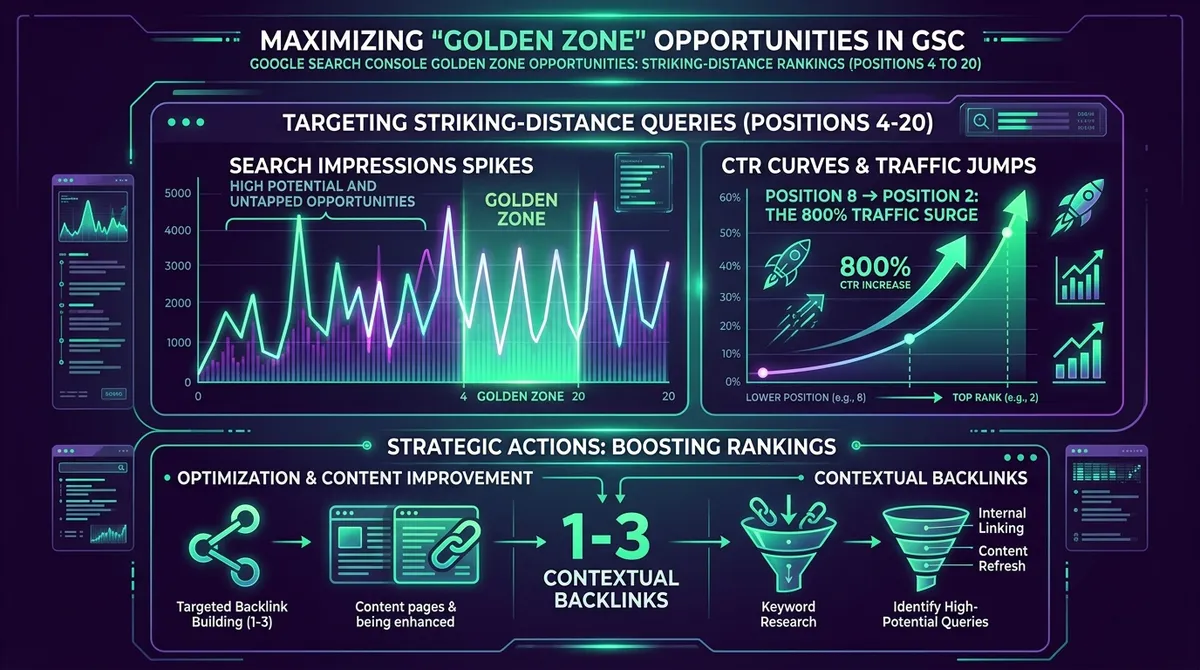
The GSC Golden Zone refers to queries ranking between average position 4.0 and 20.0 with high search impressions. Because Google already recognizes these pages as topically relevant, pointing 1 to 3 high-DA contextual backlinks to them pushes them into the Top 3, yielding an immediate 800% surge in organic click-through rate.
⚡ Key Takeaways at a Glance
- Keywords on Page 2 and bottom of Page 1 receive 90% of search impressions but less than 2% of actual clicks.
- Moving a query from Position 7 to Position 2 increases CTR from 3.2% to 24.6% (an 8x traffic jump).
- Never build backlinks blindly to low-impression pages when Golden Zone opportunities exist in your GSC data.
Most webmasters waste months building links to pages that Google has not yet validated. The secret of elite SEO operators is to let Google tell you what to link to. By extracting striking-distance keywords from Google Search Console, you can focus 100% of your link building energy where the ROI is instant and mathematically guaranteed.
1. The Google SERP CTR Cliff
According to industry click-tracking studies, Position 1 captures approximately 28.5% of all organic clicks, Position 2 captures 15.7%, and Position 3 captures 11.0%. By the time a user scrolls to Position 8, the CTR drops to 3.2%, and Page 2 queries (Positions 11–20) receive virtually zero clicks despite generating thousands of impressions. This phenomenon is known as the Click-Through Rate Cliff. Searchers have been conditioned by Google’s rapid algorithm improvements to trust only the very top results. If they don’t see what they want in the first three listings, they modify their search query rather than scrolling down. This implies a massive hidden opportunity: you likely have dozens of pages already sitting on Page 2. Google already recognizes these pages as topically relevant, but they simply lack the final fraction of PageRank necessary to push them into the Top 3. Bridging that gap is the most efficient link building investment you can make.
| Google Ranking Position | Average Organic CTR | Clicks per 10,000 Impressions | Traffic Multiplier vs Pos 10 |
|---|---|---|---|
| Position 1 | 28.5% | 2,850 clicks | 19.0x Traffic |
| Position 2 | 15.7% | 1,570 clicks | 10.5x Traffic |
| Position 3 | 11.0% | 1,100 clicks | 7.3x Traffic |
| Position 4–6 | 6.8% – 4.5% | 680 – 450 clicks | 3.5x Traffic |
| Position 7–10 | 3.2% – 1.5% | 320 – 150 clicks | Baseline (1.0x) |
| Position 11–20 (Page 2) | 0.8% – 0.2% | 80 – 20 clicks | 0.2x (Ghost Zone) |
2. How to Identify Golden Zone Pages in GSC
Filter your Google Search Console performance report for queries with: (1) Impressions > 500 in the last 28 days; (2) Average Position between 4.1 and 19.9; (3) CTR < 4%. These URLs represent validated topical authorities that only lack a modest boost in external page authority. Instead of exporting data to Excel and running complicated VLOOKUPs, modern tools like RankRoot automate this exact filtering process. By isolating these Golden Zone keywords, you immediately identify where a targeted backlink will yield the highest return on investment. Do not waste time building links to pages ranking on Position 50—the energy required to move a page from 50 to 1 is immense, whereas moving from 7 to 3 is a minor statistical adjustment in Google’s index.
3. The 1-3 Contextual Backlink Push Protocol
Once a Golden Zone URL is identified, deploy exactly 2 high-DA contextual links from Web 2.0 hubs (Medium, GitHub README, or Substack) using an LSI or Partial-Match anchor text that matches the GSC striking-distance query. Within 14 to 28 days, the page typically ascends into the Top 3. This rapid movement occurs because the page’s on-site relevance was already validated; it simply required an external vote of confidence. When publishing the Web 2.0 article, ensure the content is at least 600 words and highly relevant to the Golden Zone query. Place the backlink high up in the article, preferably within the first two paragraphs, as Google’s Reasonable Surfer model weights high-placed links significantly heavier than footer or sidebar links.
Combine external backlinks with 2 internal contextual links from your highest-traffic blog posts to accelerate indexing.
4. Correlating Ranking Jumps with GA4 Conversions
RankRoot automatically syncs your GSC keyword rankings with Google Analytics 4 conversion events. This allows you to measure the exact dollar value generated when a Golden Zone keyword jumps from Position 9 to Position 2. For e-commerce stores and SaaS platforms, moving a high-intent keyword from the bottom of Page 1 to the top 3 can double monthly recurring revenue. By tracking these specific ranking jumps against GA4 purchase events or lead form submissions, you can directly calculate the ROI of your link building campaigns. Presenting this data to stakeholders or clients instantly justifies the SEO budget, transforming backlink acquisition from a mysterious technical endeavor into a predictable revenue generation channel.
Frequently Asked Questions (FAQ)
How fast do Golden Zone pages climb after receiving new backlinks?
Because Google has already crawled and scored the on-page content, Golden Zone pages typically respond within 14 to 28 days of receiving 1 to 3 authoritative contextual backlinks.
Should I update the on-page content before building links?
Yes! Check the GSC query list for missing subheadings or semantic terms. Add a 200-word FAQ section covering the query, then deploy your external backlinks for maximum impact.

Founder and Lead SEO Architect at RankRoot. 10+ years scaling organic visibility, authority entity engineering, and penalty-immune backlink roadmaps.
Ready to Automate Your 90-Day Ranking Blueprint?
Execute your 10-minute focus mission each day. Generate safe AI anchor text, monitor 404 dead links, and climb into the Top 3.