📋 Google Business Profile Audit — Free GBP Checker
This free Google Business Profile audit scores your listing the way a customer sees it — rating, reviews, photos, categories, hours and completeness — and benchmarks every check against the top three rivals Google ranks near you, so you fix what is actually costing you the map click.
1. Find your business
How to Use This Google Business Profile Audit
- Search for your business by name and town, then pick the correct listing.
- Run the audit (1 scan credit). RankRoot pulls the live profile from Google and finds your top three local rivals.
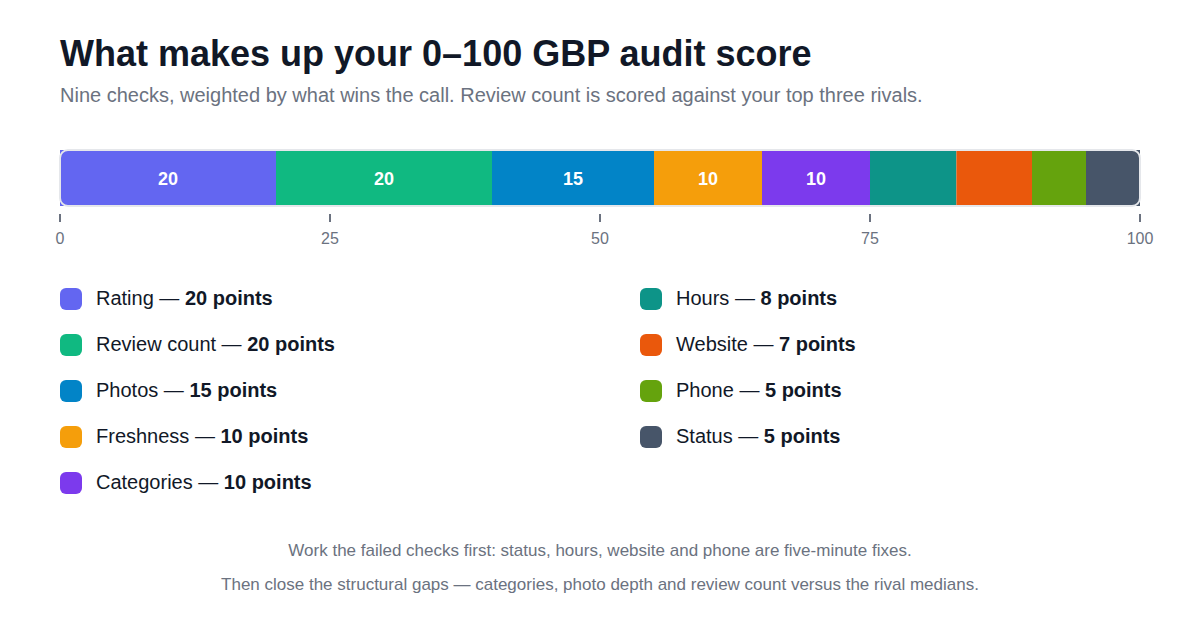
- Work the failed checks first — status, hours, website and phone are five-minute fixes that unlock clicks today.
- Then close the structural gaps: categories, photo depth and review count versus the rival medians.
- Re-audit monthly and after busy review periods to hold the score.
What a GBP Audit Catches That a Website Audit Misses
Most local journeys never reach your website first — they end on the profile. Google decides the tap on rating, review volume, freshness and completeness, in that order, before your pages get a chance. That is why BrightLocal and GMB Crush lead with a profile audit: it is the fastest honest picture of why a rival gets the call. This audit adds the piece most checkers skip — every score is relative. A 4.6 rating is strong until the three businesses outranking you sit at 4.8 with four times the reviews; then the audit tells you the real job is review velocity, not another tweak to your hours.
Pair the audit with the Local Rank Grid for the full picture: the audit scores the profile itself, the grid scores where it wins and loses on the map. Together they replace the two reports agencies most often pay a VA to assemble by hand.
What makes up your 0–100 audit score
Frequently Asked Questions
What does this Google Business Profile audit check?
It scores the signals a customer (and Google) actually sees: your star rating, how your review count compares with the top rivals nearby, how fresh your newest reviews are, photo depth, category coverage, published opening hours, website and phone links, and business status. Each check is benchmarked against the three strongest competitors Google returns for your own category near your location.
How is this different from a website SEO audit?
A website audit scores your pages. A Google Business Profile audit scores the listing that appears in Maps and the local pack — where most local clicks happen. A perfect website with a thin, stale profile still loses the map click to a rival with more reviews, fresher photos and complete categories.
Is the GBP audit free?
Yes — audits draw on the same monthly scan credits as geo-grid scans. The free Starter plan includes 5 credits a month, and paid plans raise the allowance. No card is needed to run your first audit.
Where does the audit data come from?
Live from the Google Places API — the same public data Google shows searchers. Nothing is scraped or estimated, and competitor benchmarks are the median of the top three rivals returned for your category in your area.
What score should I aim for?
85+ is excellent — the profile is doing its job and the work moves to rankings and reviews velocity. 50–84 means fixable gaps are costing clicks. Below 50, work through the failed checks in order: status, hours, website and phone first, then categories, photos and review count.
How often should I re-audit my profile?
Monthly, and after any competitor opens or a busy review period. Reviews, photos and rival profiles all move; a score that was strong in January can be mid-pack by March.
Related Free SEO Tools
A free RankRoot account adds geo-grid rank tracking, citation tracking and a 90-day authority roadmap — the whole local SEO desk, without hiring a VA.
See Plans & Start Free